![BrightonScience_Logo.png]](https://customer.brighton-science.com/hs-fs/hubfs/Brighton_Theme/Brighton%20Logos%20and%20theme/BrightonScience_Logo.png?height=40&name=BrightonScience_Logo.png)
The guidelines below will help transition your SA7001 product to use the 3 target Performance Check Surface.
The new 3 Target PCS Card has been designed to streamline the Performance Check routine while maintaining the accuracy and reliability you expect from Brighton Science products. It provides an automated testing sequences and tool correction processes to verify and maintain accurate measurement results in both laboratory and production environments.
3 Target PCS Technical Data Sheet
Content:
- New Card QR Code and Target Positions
- SA7001 Update Guide
- SA7001-DS and SA7001-AC Update Guide
- Validation and testing summary
New Card QR Code and Target Positions
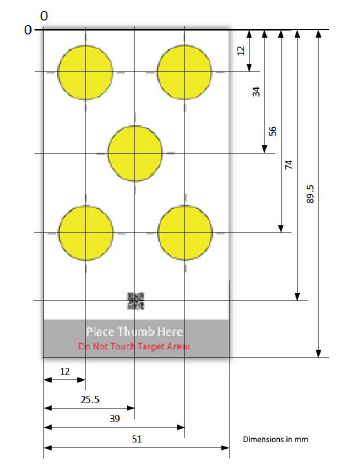
- Position of old QR code and Targets.
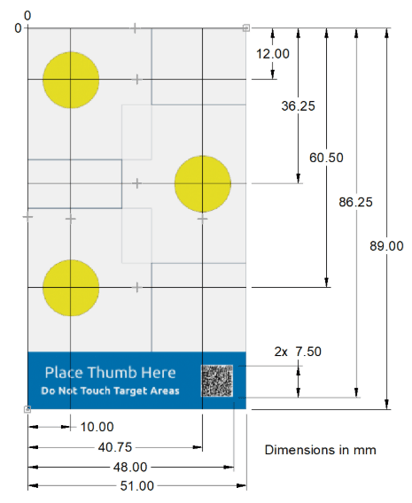
- Position of new QR code and Targets
NOTE:
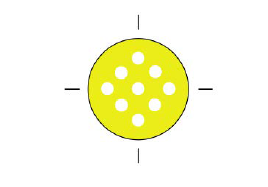
- Integrator manual for 5 target PCS routine denoted that you could take multiple measurements on a single target
- Only ONE deposition can be taken per target with the new 3 target PCS card and routine.
SA7001 Update Guide:
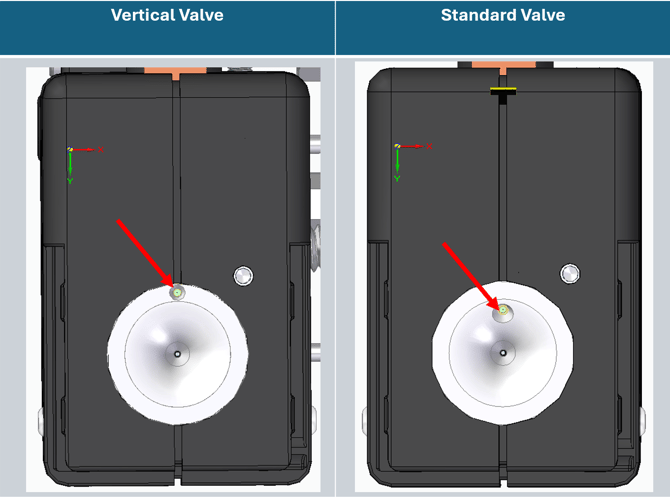
The guidance below assumes that your SA7001 has a standard valve configuration. If your configuration has a vertical valve, see the SA7001-DS guidance sections.
Look at the bottom of your measurement head to determine valve orientation:
- New Performance Check Sequence:
- The API commands are the same.
- The routine pass/fail status will now usually come after 2 Measure> or MeasureNP> commands with a rare possibility of requiring 3.
- When in the PCHK> routine the measurement commands initiate a "Compound Deposition" which is 5 depositions and measurements right on top of each other.
- 5 target routine required a minimum of 5 Measure> or MeasureNP> commands with the potential of having to repeat that entire 5 measurement cycle multiple times.
- Example command sequence:
- Move measurement head above barcode
- Send: PCHK(5)>
- Wait for:
- PCHK>
- ScanOK(31176,241053,2.90,95,02,02.5,2602,2708,https://brightsci.io/A9MzZCH?lot_id=241053)>
- PCHK_CAM_READY_1>
- Move measurement head above 1st target
- Send: Measure>
- Wait for:
- Measure(a,b,c,d,e,f,g,h,i)>
- See API guide for measurement result data
- Image from inspection (binary packet encoded in PNG image format)
- PCHK_CAM_READY_2>
- Measure(a,b,c,d,e,f,g,h,i)>
- Move measurement head above 2nd target
- Send: Measure>
- Wait for:
- Measure(a,b,c,d,e,f,g,h,i)>
- See API guide for measurement result data
- Image from inspection (binary packet encoded in PNG image format)
- PCHK_PASSED_STOP
- Measure(a,b,c,d,e,f,g,h,i)>
- Stop/Complete Cycle
-
-
- NOTE:
- See API guide for possible error responses
- Measure> can be replaced with MeasureNP> if no picture data is required.
- PCHK_CAM_READY_3> may occur after the second Measure> command, requiring a move to the third target and an additional Measure> command before getting the final PCHK status.
- NOTE:
-
SA7001-DS and SA7001-AC Update Guide:
The guidance below assumes that your SA7001-DS or SA7001-AC has a vertical valve configuration
- New Performance Check Sequence:
- The API commands are the same.
- For vertical valve configurations, the build up of the 5 depositions and measurements on top of each other (Compound Deposition), must be done manually as the robot must move back and forth between each step.
- Example command sequence:
- Move measurement head camera above barcode
- Send: PCHK(5)>
- Wait for:
- PCHK>
- ScanOK(31176,241053,2.90,95,02,02.5,2602,2708,https://brightsci.io/A9MzZCH?lot_id=241053)>
- PCHK_CAM_READY_1>
- Move measurement head camera above 1st target
- Compound Deposition:
- Send: MeasureDiscreteStart>
- Wait for: SubstrateCaptured>
- Move valve over target (8.3mm offset)
- Send: MeasureDropDispense>
- Wait for: DropDispensed>
- Move Camera over target (8.3mm offset)
- Send: MeasureInspect>
- Wait for:
- DropCaptured>
- Image from inspection (binary packet encoded in PNG image format)
- Move valve over target (8.3mm offset)
- Send: MeasureDropDispense>
- Wait for: DropDispensed>
- Move Camera over target (8.3mm offset)
- Send: MeasureInspect>
- Wait for:
- DropCaptured>
- Image from inspection (binary packet encoded in PNG image format)
- Move valve over target (8.3mm offset)
- Send: MeasureDropDispense>
- Wait for: DropDispensed>
- Move Camera over target (8.3mm offset)
- Send: MeasureInspect>
- Wait for:
- DropCaptured>
- Image from inspection (binary packet encoded in PNG image format)
- Move valve over target (8.3mm offset)
- Send: MeasureDropDispense>
- Wait for: DropDispensed>
- Move Camera over target (8.3mm offset)
- Send: MeasureInspect>
- Wait for:
- DropCaptured>
- Image from inspection (binary packet encoded in PNG image format)
- Move valve over target (8.3mm offset)
- Send: MeasureDropDispense>
- Wait for: DropDispensed>
- Move Camera over target (8.3mm offset)
- Send: MeasureInspect>
- Wait for:
- DropCaptured>
- Measure(a,b,c,d,e,f,g,h,i)>
- See API guide for measurement result data
- Image from inspection (binary packet encoded in PNG image format)
- Wait for: PCHK_CAM_READY_2>
- Move measurement head camera above 2nd target
- Repeat Compound Deposition sequence above
- Wait for: PCHK_PASSED_STOP
- Stop/Complete Cycle
-
-
- NOTE:
- See API guide for possible error responses
- MeasureInspect> can be replaced with MeasureInspectNP> if no picture data is required.
- PCHK_CAM_READY_3> may occur after the second Compound deposition sequence, requiring an additional Compound deposition before getting the final PCHK status.
- NOTE:
-